

L3 Pipeline board designs
GHL pipeline customization that shows where patients stall
12 board designs give every stage its own colour, cleaner deal cards and a styled toolbar. Your stages and deals do not change; they just become readable at a glance.
Example stage names for a new-patient journey. Use whatever stages your clinic already has.
What a board design restyles
GHL pipeline customization restyles the opportunities board, never the pipeline itself. Each of the 12 designs sets stage colours by column position, column headers and backgrounds, deal cards in three densities, value colours, the toolbar and the list view, in light or dark.
Try every board design
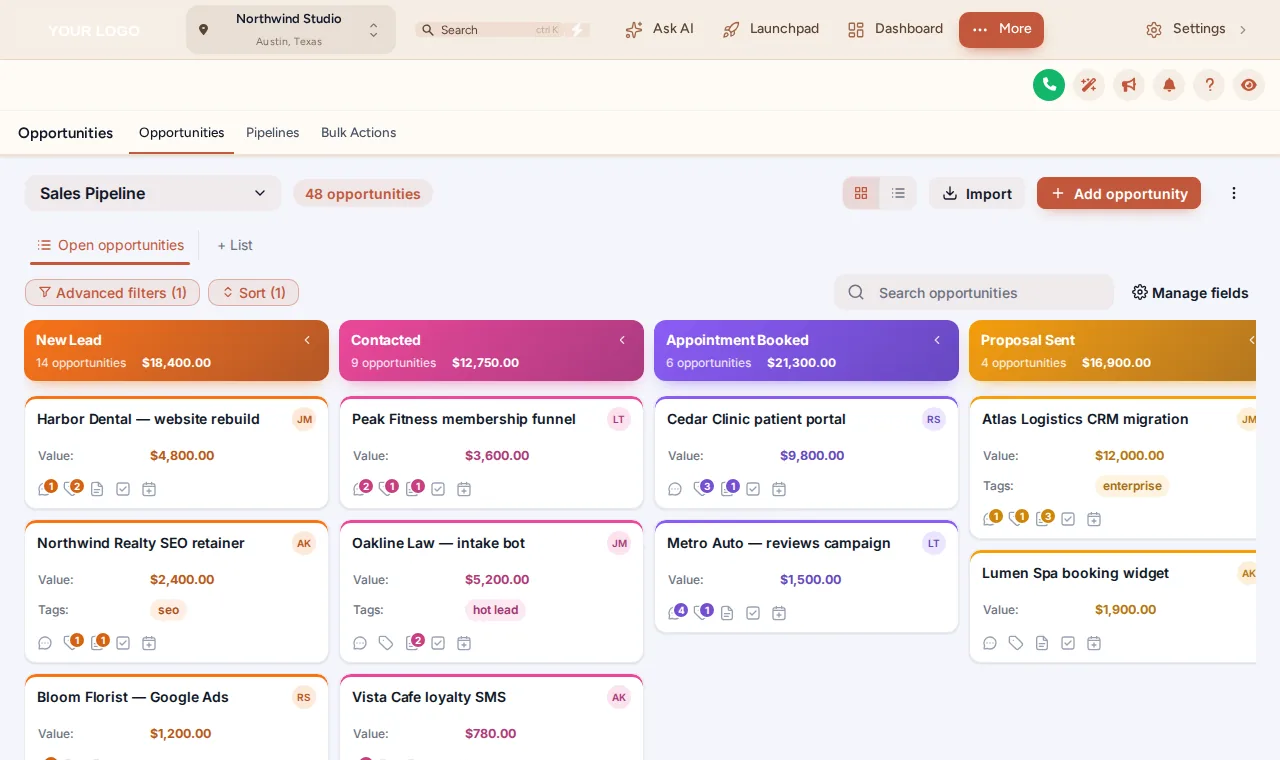
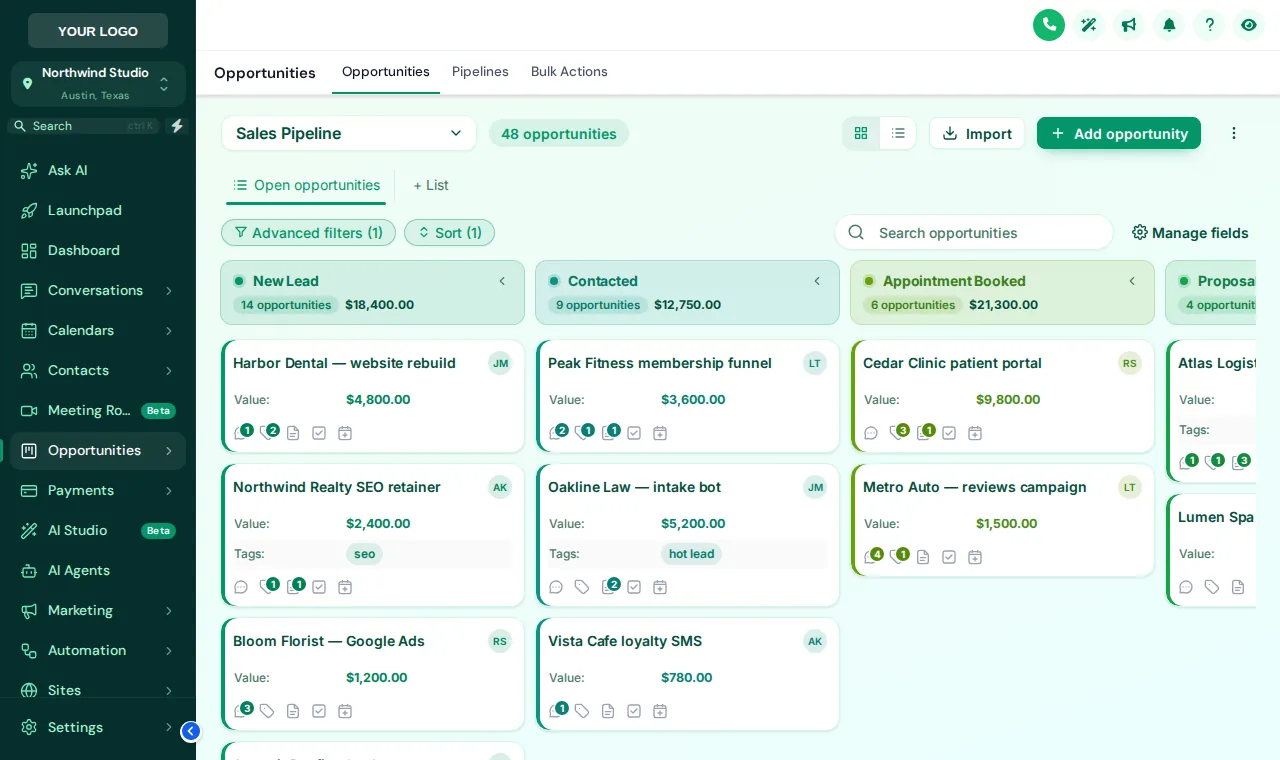
A sample opportunities board restyled by the real engine. It opens on Gradient Headers; scroll the board sideways to see every stage.
Loading the live preview
Gradient HeadersA copy of the opportunities board with sample deals, restyled by the real engine. Stage colours follow column position, so your own stages pick them up whatever they are called.
The 12 designs
- Clean LightSoft grey lanes, white cards, colour dot per stage
- Frosted GlassColour-mesh board, see-through lanes and cards
- Midnight NeonDeep navy board, glowing stage lines, neon accents
- Neo BrutalThick outlines, hard shadows, loud stage colours
- Candy PastelEach lane softly tinted in its own pastel colour
- Gradient HeadersBold gradient stage headers above clean cards
- Compact ProDense and flat: more deals on screen at once
- Colour RibbonStage-coloured ribbons and lightly tinted cards
- Obsidian GoldBlack and gold, premium and calm
- Ocean ProCorporate blues, solid header bands
- Emerald CalmFresh greens, soft tinted lanes
- Brand MatchStage colours built from your primary colour
How to restyle the opportunities board
Pick a board design
Switch on the opportunities restyle and choose one of 12 designs.
Set the stage colours
Keep the template colours, build them from your brand colour or choose each one. Colours follow column position, not stage names.
Tune the cards and toolbar
Choose card density, how the stage colour shows (stripe or dot), value colours and the toolbar style above the board.
Save
Every sub-account board picks up the design on its next page load. Pipeline settings and deals are untouched.
Pipeline board questions
What does GHL pipeline customization change?
The look of the opportunities board: stage column headers and backgrounds, deal card style and density, value colours, the toolbar above the board and the list view. Your pipelines, stages, deals and automations stay exactly as they are.
How many board designs are there?
12: Clean Light, Frosted Glass, Midnight Neon, Neo Brutal, Candy Pastel, Gradient Headers, Compact Pro, Colour Ribbon, Obsidian Gold, Ocean Pro, Emerald Calm, Brand Match.
Do the colours depend on my stage names?
No. The first stage gets the first colour, the second the next, and they repeat after the last one, so every pipeline in every sub-account picks up the design.
Does dragging deals still work?
Yes. Cards do not move on hover, so dragging a deal to the next stage stays as precise as on the stock board.
Is the list view styled too?
Yes, the table behind the list toggle can follow the same design. The preview above shows the board view.
Can I use dark boards?
Yes. Dark designs such as Midnight Neon and Obsidian Gold put light text on dark columns and cards.
How does this help a chiropractic clinic?
A new-patient pipeline (enquiry, first visit booked, report of findings, on care plan, wellness) reads at a glance when each stage has its own colour, so the front desk sees where patients are stalling.
Does it change reporting?
No. Reports and dashboards read the same data; only the board’s presentation changes.
Which plan includes the pipeline designer?
Adjustment Plus ($467 once) and above.
See the whole patient journey at a glance
All 12 board designs, with dashboards, menus and contact actions, come with Adjustment Plus for $467 once.
- Login by email, max 24 hours
- One line of code, about 2 minutes
- No monthly fee, ever
Keep adjusting
GHL Chiropractor Snapshot is an independent business. GoHighLevel and HighLevel are trademarks of their owner; we are not affiliated with or endorsed by HighLevel. GHL Customizer accounts run on the GHL Customer Care customizer platform. Screens on this page are our own captures of sample data, not real patient or client records.