

Should a Phoenix chiropractor build on Astro or WordPress? For a clinic website whose only job is turning local searchers into booked exams, Astro wins on the two things that decide it — page speed and Core Web Vitals — where a typical WordPress site struggles. The stakes are concrete: 53% of mobile visitors abandon a site that takes longer than three seconds to load (Google/DoubleClick, 2016), and in the 2024 HTTP Archive Web Almanac the median WordPress site scored just 38 out of 100 on mobile Lighthouse performance (HTTP Archive Web Almanac, 2024). In a competitive market like Phoenix, that gap is the difference between a patient booking with you or tapping the next clinic on the map.
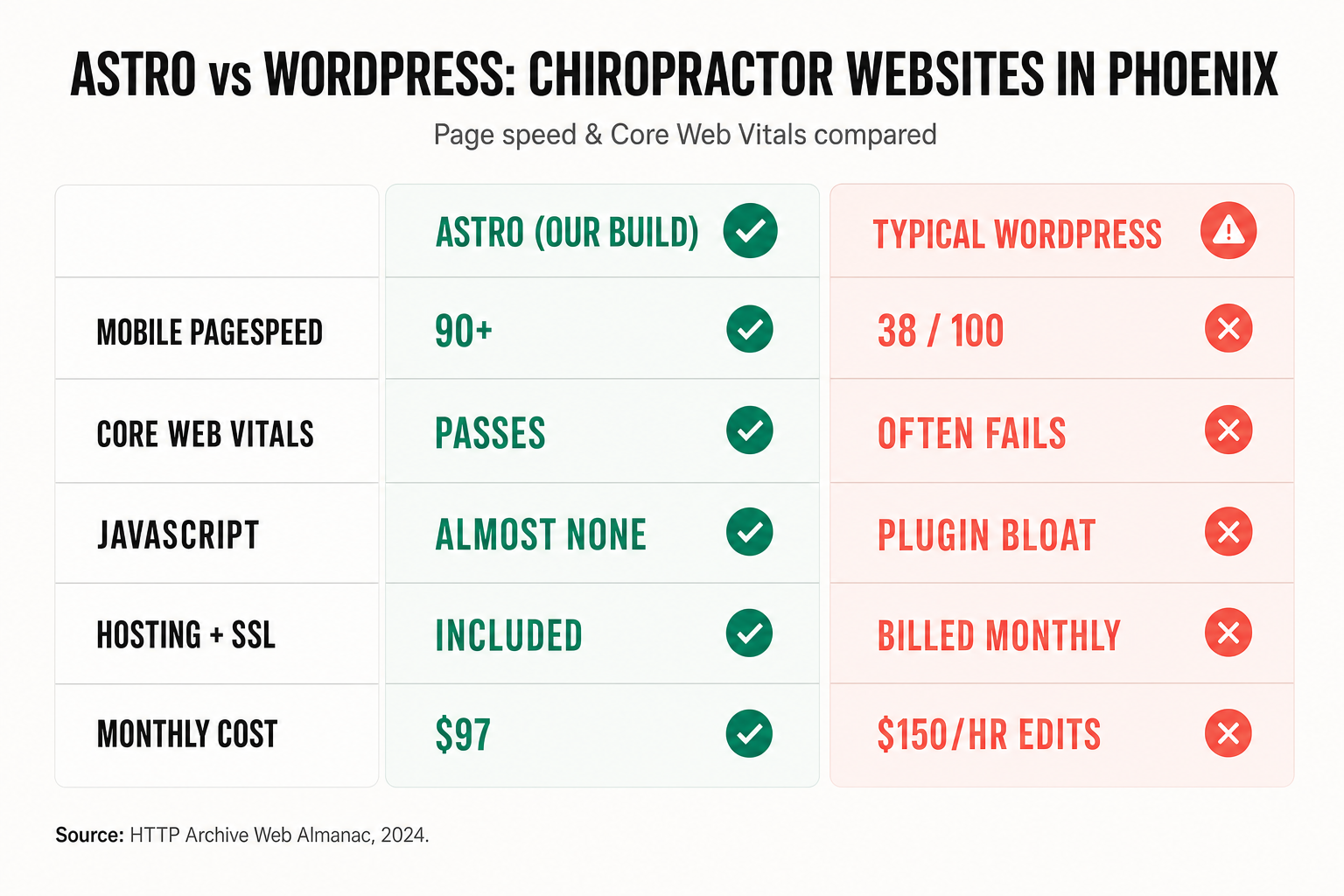
This is a like-for-like comparison for chiropractic clinic owners and the agencies that build for them — not a developer flame war. We’ll look at what actually moves the needle for a local practice: how fast each platform loads on a phone, whether it passes Google’s Core Web Vitals, how that feeds your local Map Pack ranking, and what each really costs over a year. Every statistic is sourced and dated.
Table of contents
- Astro vs WordPress: the short answer for chiropractors
- Why page speed decides whether a Phoenix patient books
- Core Web Vitals, explained for clinic owners
- The head-to-head: WordPress vs Astro on the things that matter
- How speed feeds your Phoenix local SEO
- The real cost over a year
- When WordPress is still the right call
- Frequently asked questions
Astro vs WordPress: the short answer for chiropractors
If your website exists to convert local searchers into new patients — and a clinic site has no other job — Astro is the better foundation and WordPress is the heavier one. Astro is a modern framework that renders your pages to static HTML and ships almost no JavaScript by default, so pages open near-instantly on a phone. WordPress is a 20-year-old content-management system that, in the real world, gets loaded down with a theme, a page builder, and a stack of plugins — each adding weight that a patient’s phone has to download and run before your “Book an Exam” button appears.
That isn’t a theoretical difference. It shows up in Google’s own field measurements. The 2024 HTTP Archive Web Almanac found the median WordPress site scored 38/100 on mobile Lighthouse performance and 61/100 on desktop (HTTP Archive, 2024) — mobile sitting squarely in the “Needs Improvement” range. A well-built Astro site routinely lands in the 90s; that’s why our chiropractic website build carries a guaranteed 90+ Google PageSpeed score, often a perfect 100, on both mobile and desktop.
None of this means WordPress can’t be made fast — it can, with disciplined engineering, aggressive caching, and ruthless plugin hygiene. The point is what happens by default, at the price a clinic actually pays, maintained by a busy front desk. On that realistic footing, Astro starts fast and stays fast; WordPress starts slow and needs constant work to catch up.
Why page speed decides whether a Phoenix patient books
Here’s the moment that matters: someone in Ahwatukee wakes up with a stiff neck, types “chiropractor near me” into their phone, and taps your listing. If your homepage doesn’t paint in a couple of seconds, they’re gone — back to the results, onto a competitor. This is measured behavior, not a hunch.
Google’s research with DoubleClick found that 53% of mobile site visits are abandoned if a page takes longer than three seconds to load (Google, 2016). And the drop-off compounds the slower you get: analyzing real mobile field data, Google found that as page load time goes from one second to three seconds, the probability of a bounce increases 32%; to five seconds, 90%; and to ten seconds, 123% (Google/SOASTA, 2017).
Speed doesn’t just prevent losses — it lifts conversions. In the Deloitte and Google study Milliseconds Make Millions, a 0.1-second improvement in mobile load time drove an 8.4% lift in retail conversions and a 10.1% lift in travel conversions across 37 brands and 30 million-plus sessions (Deloitte/Google, 2020). For a chiropractor, “conversion” is a booked exam — and a tenth of a second sounds trivial until you’re the clinic that captured the patient a slower competitor lost.
This is why speed belongs in the same conversation as your first-visit funnel and online scheduling. You can run flawless Google Ads and a perfect booking flow, but if the landing page stalls, you’ve paid for a click that never becomes a patient.
Core Web Vitals, explained for clinic owners
Core Web Vitals are Google’s three field measurements of real-world page experience. You don’t need to be technical to grasp them — each maps to something a patient literally feels:
- LCP (Largest Contentful Paint) — how long until the main content shows up. Good is under 2.5 seconds. This is the “is anything happening yet?” moment.
- INP (Interaction to Next Paint) — how quickly the page responds when someone taps a button or menu. Good is under 200 milliseconds. INP replaced the older FID metric in March 2024.
- CLS (Cumulative Layout Shift) — how much the page jumps around as it loads. Good is under 0.1. High CLS is why you tap “Call now” and accidentally hit an ad.
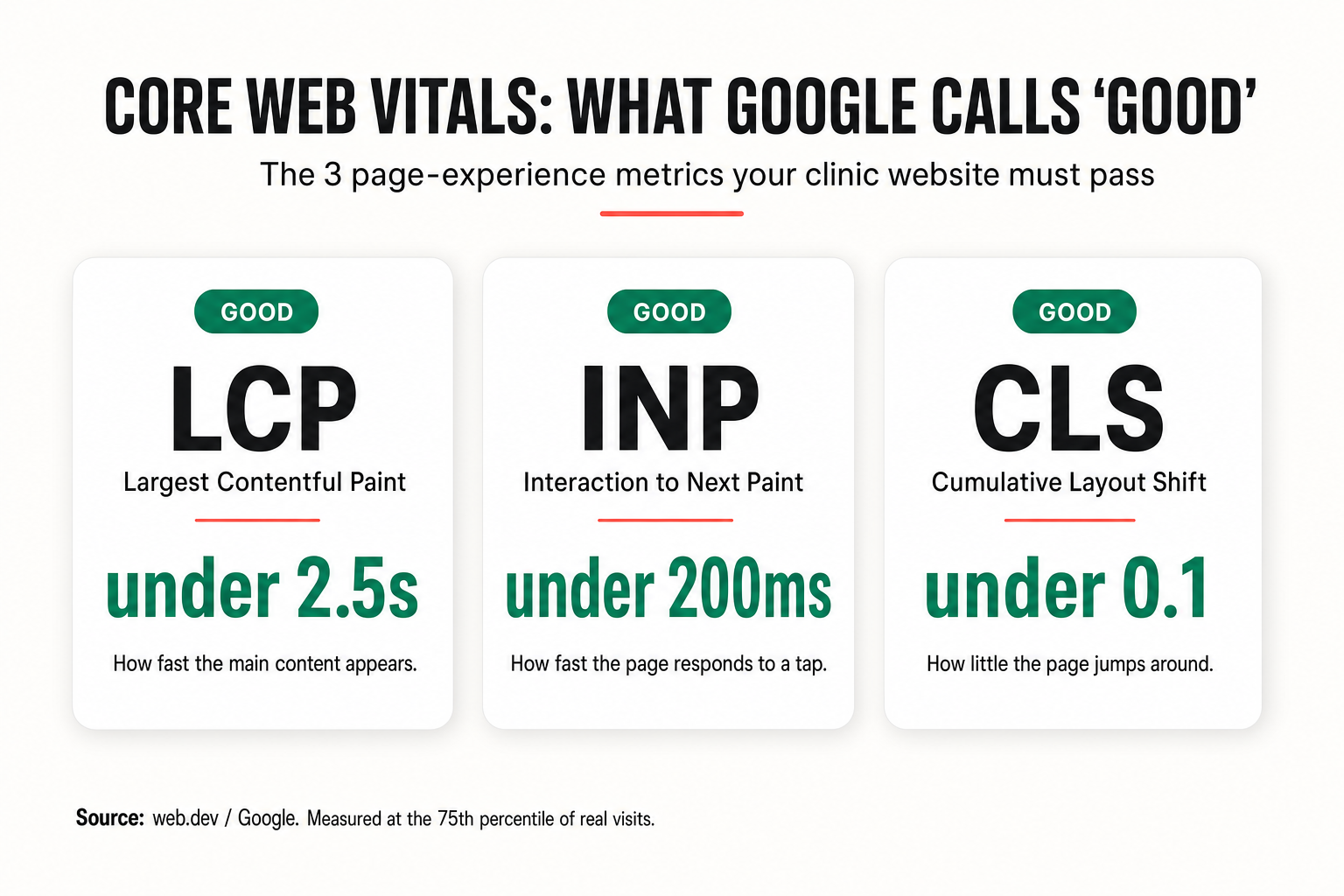
Those thresholds are Google’s, measured at the 75th percentile of your real visitors (web.dev). And they aren’t academic: Google confirms Core Web Vitals are used by its ranking systems as part of the page-experience signal (Google Search Central). Google is clear that great content still comes first — but between two comparable Phoenix clinics, the faster, more stable page has the edge.
The reason platform choice matters so much here is that Core Web Vitals are hard to bolt on after the fact. A page builder that loads three fonts, a slider library, and analytics before your headline paints will fight you on LCP no matter how many caching plugins you stack. Astro’s static-first approach starts from the other end: minimal JavaScript, content rendered ahead of time, so “good” Vitals are the default rather than a months-long optimization project.
The head-to-head: WordPress vs Astro on the things that matter
Here’s the like-for-like comparison for a chiropractic clinic site — the same view we use when a Phoenix practice asks whether to rebuild. Astro is the framework behind our done-for-you clinic sites; “Typical WordPress” is the real-world default of a themed site with a page builder and the usual plugin stack.
| What matters for a clinic site | Astro (our build) | Typical WordPress |
|---|---|---|
| Median mobile performance | 90+ (guaranteed) | 38/100 (HTTP Archive, 2024) |
| Core Web Vitals (LCP/INP/CLS) | Passes by default | Frequent LCP/INP failures from bloat |
| JavaScript shipped | Almost none (static-first) | Theme + builder + plugins |
| Hosting, SSL & maintenance | Included, one monthly price | Billed separately, ongoing |
| Plugin security patching | No plugin surface to patch | Constant updates / vulnerabilities |
| SEO / AEO / GEO setup | Schema, meta, sitemap, llms.txt built in |
Bolt-on plugins, often incomplete |
| Local (per-city) pages | One optimized page per area you serve | Rarely built well |
| Editing hours or a service | Support ticket, done in ≤ 5 days | DIY plugin wrangling or $150/hr |
The pattern is consistent: Astro’s advantages come from removing weight and moving work to build time, while WordPress’s costs come from adding layers that each need to load, update, and be secured. For a clinic that wants a fast site and doesn’t want to become a part-time webmaster, that’s the whole ballgame. (WordPress’s genuine strengths — and when they matter — are covered below.)
How speed feeds your Phoenix local SEO
Page speed and Core Web Vitals aren’t a separate project from ranking in the Phoenix Map Pack — they feed it. Google’s page-experience signal rewards fast, stable pages, and a faster site keeps visitors engaged, which sends the behavioral signals Google associates with a helpful result. Speed is one of the technical foundations underneath everything in the local SEO for chiropractors playbook.
The local intent in a market like Phoenix is enormous and immediate. 76% of people who conduct a local search on their smartphone visit a related business within a day, and 28% of those searches result in a purchase (Think with Google, 2016). A patient searching “chiropractor Phoenix” or “back pain Scottsdale” is often ready to book today — but a page that stalls on their phone hands that ready-to-book patient to a faster competitor before they ever see your reviews or your calendar.
There’s a compounding effect, too. A fast site lets you profitably run Google Ads (Google’s Quality Score factors in landing-page experience, so speed can lower your cost per click) and publish city- and neighborhood-level pages — Phoenix, Tempe, Mesa, Chandler, Glendale, Scottsdale — without each one dragging performance down. That’s how a clinic turns “chiropractor near me” traffic into a full schedule, and it’s baked into how we build. For the full set of clinic conversion benchmarks, keep the 2026 chiropractic marketing statistics handy.
The real cost over a year
Speed is the headline, but total cost is where clinic owners feel the difference month to month. A “cheap” WordPress site rarely stays cheap.
On WordPress, the sticker price is only the start. You typically layer on hosting, an SSL certificate, premium theme and plugin renewals, a page-builder license, security and backup tools, and developer time for every real change — the industry norm of roughly $150/hour and a waiting list for a one-line edit to your hours or a new service page. Each plugin is also a maintenance and security liability: something to update, something that can break, something that can be exploited.
Our Astro build folds all of that into one predictable number: $497 one-time plus $97/month, and you only pay the monthly invoice up front — the one-time fee isn’t charged until the site is live and you’re happy (Get a Website). The $97 covers managed Cloudflare hosting, your domain, SSL, and maintenance, plus up to 10 change tickets a month — new service pages, updated hours, staff changes — most completed within five days, small ones often within 24 hours. Run multiple locations? Up to five sites are $1,200 one-time + $297/month. Add auto-blogging (two posts a week) for $197/month total.
The honest framing: WordPress can be cheaper if you already have the technical skills to build and maintain it yourself. For a chiropractor whose time is worth more in the adjustment room than in a plugin dashboard, the done-for-you Astro path is usually cheaper and faster once you count the hours — and it doesn’t leave your website one failed plugin update away from downtime.
When WordPress is still the right call
This comparison is scoped to chiropractic clinic sites, and fairness matters. WordPress genuinely shines when:
- You need a large, complex content operation — hundreds of posts, multiple authors, an editorial workflow with roles and permissions.
- You depend on a specific plugin ecosystem — a particular membership, LMS, or e-commerce plugin with no clean equivalent.
- You have in-house technical talent who will actively maintain performance, security, and updates.
- You want to self-host and fully own the stack and have the team to run it.
For most chiropractic and wellness practices, none of those apply. The site needs to load fast, rank locally, show reviews, and book exams — which is exactly the job Astro does with less weight and less upkeep. If your current WordPress site is slow, the fix isn’t necessarily a year of optimization; often it’s a clean rebuild on a faster foundation, with your content and SEO carried over. That migration is what our website service and GHL development team handle.
Frequently asked questions
Astro vs WordPress for chiropractor websites — FAQ
Is Astro really faster than WordPress for a chiropractor website?
In the typical real-world case, yes. Astro renders pages to static HTML and ships almost no JavaScript, so pages open near-instantly. The 2024 HTTP Archive Web Almanac found the median WordPress site scored 38/100 on mobile Lighthouse performance, while a well-built Astro site routinely scores 90+. WordPress can be made fast with expert engineering and strict plugin discipline, but Astro is fast by default.
What is a good Core Web Vitals score for a clinic website?
Google's 'good' thresholds are LCP under 2.5 seconds, INP under 200 milliseconds, and CLS under 0.1, measured at the 75th percentile of your real visitors (web.dev). A clinic site should aim to pass all three on mobile, since that's where most new-patient traffic comes from. You can check your own site free in Google PageSpeed Insights.
Does page speed actually affect my Google ranking in Phoenix?
Yes, as part of Google's page-experience signal — Core Web Vitals are used by Google's ranking systems (Google Search Central). Google is clear that helpful content comes first, but between two comparable Phoenix clinics, the faster, more stable page has an edge. Speed also improves engagement and lowers Google Ads costs, both of which support local visibility.
How much does a fast chiropractic website cost?
Our Astro-built clinic site is $497 one-time + $97/month, and you pay only the monthly invoice up front — the one-time fee is charged after the site is live and you're happy. The $97/month covers managed hosting, domain, SSL, maintenance, and up to 10 change tickets a month. A typical WordPress site's true cost adds hosting, SSL, plugin renewals, and developer time (often ~$150/hr) on top of the build.
Can I move my existing WordPress site to Astro without losing my SEO?
Yes. A proper migration preserves your URLs (or sets 301 redirects), carries over your content and meta, and rebuilds your schema, sitemap, and internal links — so rankings transfer and usually improve as speed and Core Web Vitals get better. That's exactly what a done-for-you rebuild handles; you don't touch a plugin dashboard.
Do I still get an easy way to update my site if it's not WordPress?
Yes. Instead of logging into a plugin dashboard, you open a support ticket (up to 10 per month) for any change — new service pages, updated hours, staff changes. Most are completed within five days, small ones often within 24 hours, with no per-edit agency fees. You focus on patients; the website team handles the site.
About the author
Derek Osei is the Local Marketing & Reviews Specialist on the GHL Chiropractor Snapshot team, based in Tampa, FL. He builds the Google Business Profile, review-generation, and local-discovery systems that ship inside the snapshot, with a background in local SEO and reputation marketing for service businesses. He writes practical, no-fluff playbooks on turning local search intent into booked exams. Derek is an automation and marketing specialist, not a licensed chiropractor, and nothing here is medical advice.
Related posts
- Local SEO for Chiropractors in 2026: Rank #1 in the Google Map Pack — the local-search system your fast site feeds.
- The First-Visit Funnel: Turning Clicks into Booked Exams in Under 5 Minutes — where a fast landing page turns into a booked patient.
- Online Scheduling for Chiropractors: The 24/7 Self-Booking System — the booking flow your homepage should lead to.
- Google Ads for Chiropractors: The Local Search PPC Playbook (2026) — why a fast landing page lowers your cost per click.
Sources
- Google — The need for mobile speed (2016)
- Think with Google — Mobile page speed: new industry benchmarks (2017)
- Deloitte / Google — Milliseconds Make Millions (2020)
- HTTP Archive — Web Almanac 2024, CMS chapter (2024)
- web.dev — Defining the Core Web Vitals metrics thresholds
- Google Search Central — Core Web Vitals and Google Search
- Think with Google — Mobile search trends: consumers to stores (2016)
- Statista — Share of website traffic from mobile devices (2025)
Figures are attributed to the sources and years shown. Google’s mobile-speed and bounce statistics are drawn from Google/DoubleClick (2016) and Google/SOASTA (2017) field data; the WordPress median score is from the HTTP Archive Web Almanac 2024 and reflects the median site, not every site. Our Astro “90+” figure is a build guarantee, not a measurement of any specific competitor. Platform performance and local-search behavior vary by configuration, audience, and methodology — treat the numbers as ranges, not guarantees. This article is marketing and operations guidance for chiropractic clinics and the agencies that serve them; it is not medical, legal, or financial advice.