

It is a Thursday afternoon and you are three patients behind. Your software contract renews next month, the quote went up again, and a rep from a cloud system just emailed to say they can “get you off that old platform in a weekend.” You have sat through two demos this quarter. Both sounded identical. Both ended with “let’s talk pricing on a call.” You still cannot answer the one question that actually matters: for a practice your size, which one of these is worth the switch, and which one just moves your problems to a new login?
For a solo or small chiropractic practice in 2026, the honest answer is that Jane and ChiroFusion are the cheapest, cleanest places to land if you want records, scheduling and billing without demo-gated pricing; zHealth is the strongest value if you want built-in texting and recall baked into the records system; and ChiroTouch is the heaviest and most expensive, worth it mainly for larger insurance-driven groups that need its depth. But every one of these four is a records-and-billing tool first. None of them is built to win back the patient who stopped coming at visit 6, and that is the gap that costs you more than any license. This guide breaks down the four across eight things that decide the bill, with real numbers and where each one came from, so you can walk into the next demo already knowing the answer.
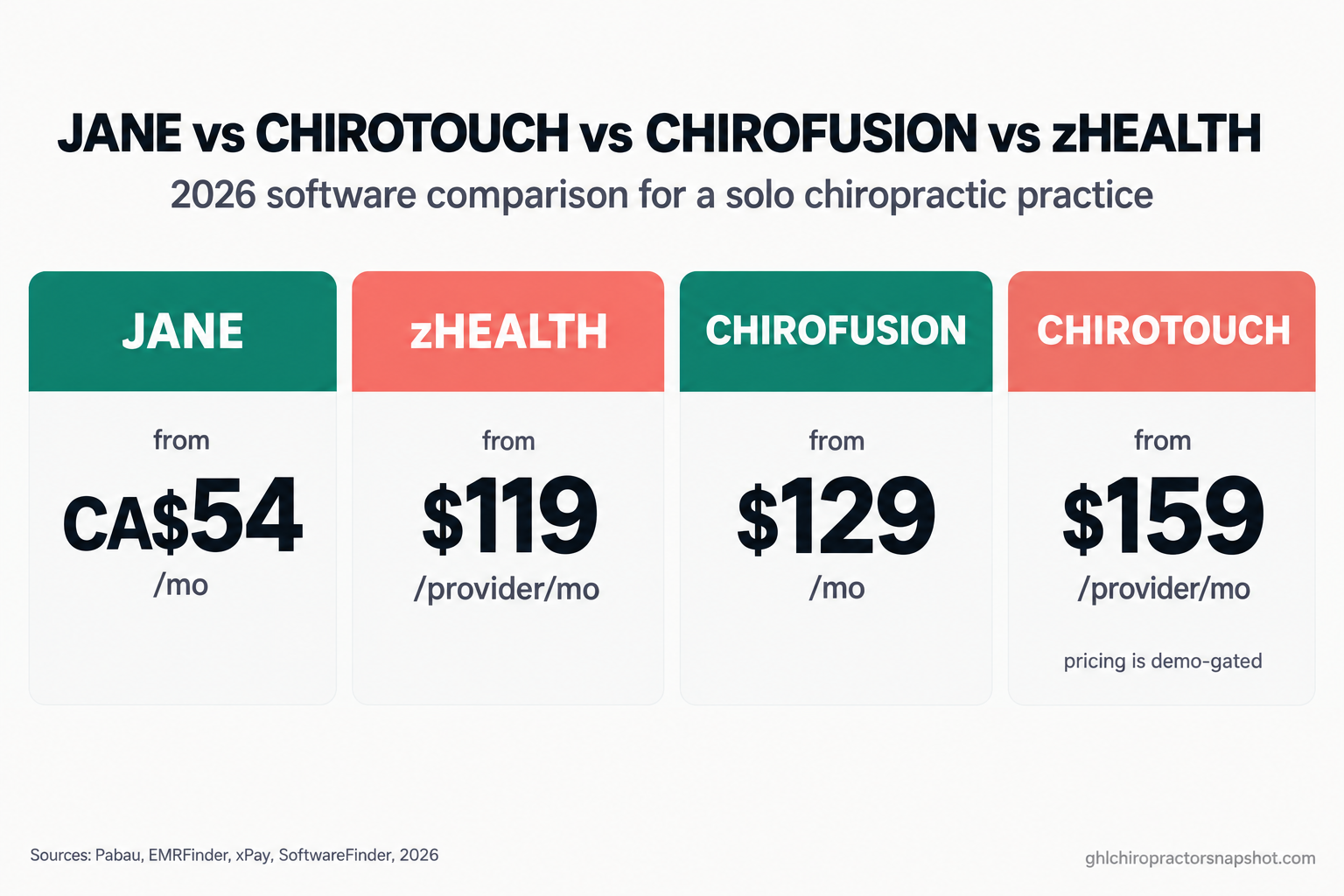
Table of contents
- What these four tools actually are
- What chiropractic software really costs in 2026
- The eight things to compare before you switch
- The full comparison, side by side
- Run the numbers for three clinic sizes
- Steal this: the demo questions and the data-export request
- Where every one of these tools leaves a gap
- Staying HIPAA-aware when your software texts patients
- Objections from the treatment room
- Frequently asked questions
What these four tools actually are
Before you compare prices, get the category straight, because the pitches blur it on purpose. Chiropractic practice software does three different jobs: it keeps clinical records and runs the schedule (the EHR and practice-management layer), it handles patient communication like reminders and payments, and it drives growth through recall, reactivation and reviews. Jane, ChiroTouch, ChiroFusion and zHealth all live in that first bucket. They are records-and-billing systems that bolt on some communication. We covered the full three-layer map in our 2026 buyer’s guide to chiropractic software; this post zooms into the four records systems a solo DC actually shortlists.
Here is the one-line version of each. Jane is a clean, cloud-based charting and scheduling tool popular with cash and hybrid clinics; it is Canadian, so its list prices are in Canadian dollars. ChiroTouch is the big, established, insurance-heavy platform, and the one that hides its full price until you take a call. ChiroFusion is a budget-friendly, ONC-certified cloud EHR aimed at solo and small insurance practices that want a low entry price and no long contract. zHealth is a newer chiropractic EHR that bakes communication, texting, automated recall and no-show reminders, into the records system instead of a separate tool.
The mistake that wastes the most money is treating any of these as an all-in-one growth engine. They are not. They are where your notes and claims live. What fills your schedule is a separate job, and we will come back to it.
What chiropractic software really costs in 2026
Chiropractic is a real market with real software budgets. More than 35 million Americans see a chiropractor each year, roughly 10% of the population (American Chiropractic Association, drawing on Gallup-Palmer survey data). The US chiropractic sector is about $24.0 billion across roughly 66,061 businesses (IBISWorld, 2026). Most of those are small practices, and software is one of their biggest fixed monthly costs. So the published entry prices are the right place to start.
Those numbers are not apples to apples, which is the whole problem. Jane’s CA$54 Balance plan is capped at 20 booked appointments a month and one practitioner profile (Pabau, 2026); its real working tier is Practice at CA$79 or Thrive at CA$99. ChiroFusion’s roughly $129 entry is billed annually (about $149 month to month) and is the only one of the four that keeps front-desk and billing staff logins free (xPay, 2026). zHealth and ChiroTouch both price per provider, so the number you see is the number for one DC only.
The entry price is the lowest number you will ever pay. Add-ons, processing fees, extra providers and annual increases all push the real monthly cost up from there. That is what the eight comparisons below are for.
The eight things to compare before you switch
Ignore the feature checklists with 200 rows. Eight things decide whether a platform is right for your practice and what it will really cost.
1. The core job: records, scheduling and billing
All four handle notes, scheduling and documentation competently. The real split is insurance billing depth. ChiroTouch and ChiroFusion are built for clinics that live on insurance claims, with ChiroFusion offering an ONC-certified EHR and integrated claims management at a budget price (SoftwareAdvice, 2026). zHealth includes electronic billing, claims and auto-posting of ERA and EOB even on its Basic tier (EMRFinder, 2026). Jane does charting and scheduling beautifully but treats insurance billing as a paid add-on rather than the core workflow.
How it breaks: a cash-leaning clinic buys the heavy insurance platform “to be safe” and pays for claims depth it never touches; a busy insurance clinic buys the charting-first tool and fights billing workarounds for a year. Match the tool to the claims volume you actually run.
2. The real monthly price for a solo practice
For one DC, the gap is wide. Jane’s working tier lands around CA$79 to CA$99. zHealth Basic is $119. ChiroFusion’s entry is about $129 billed annually. ChiroTouch Core is reported at $159 (SoftwareFinder, 2026), and that is before the add-ons the platform is known for. Our full ChiroTouch pricing teardown walks through how the number climbs.
How it breaks: you pick the lowest sticker price, then find the cheap one charges separately for the one feature you need daily. Price the configuration you will actually run, every add-on included.
3. What is included versus what is bolted on
This is where the quoted price and the invoice part ways. Jane adds insurance billing for about CA$20/mo plus a small per-license fee, and charges payment-processing rates of 2.6% plus $0.10 in person and 2.85% plus $0.25 online (Jane Payments). ChiroFusion bundles more into the base and keeps staff users free (SaaSworthy, 2026). zHealth gates the good communication features to its top tier. ChiroTouch stacks the most, with payments, reminders and intake reported as separate line items (ITQlick, 2026).
How it breaks: the demo shows every feature turned on, the quote reflects the base plan, and the gap between the two is your real bill. Ask for a quote with every box you saw in the demo actually enabled.
4. Insurance billing versus the cash workflow
If PIP, auto-injury or workers’ comp is a real part of your book, you need genuine claims depth, and ChiroTouch or ChiroFusion earn their keep. If you run cash care plans and memberships, Jane and zHealth keep the workflow simpler and cheaper. This is also where your state matters: a Florida or New York clinic working personal-injury cases has very different billing needs than a cash wellness practice in Texas, so weigh the billing engine against your real payer mix.
How it breaks: a hybrid clinic picks a cash-first tool, then wins a few auto-injury cases and has no clean way to bill them. Build for the payer mix you will have in 18 months, not the one you have today.
5. Patient communication: texting, reminders and online booking
Patients expect to book and be reminded on their phone. Around 67% of patients prefer to book online rather than call (Phreesia-aligned industry data, 2025), and text reminders are now table stakes. zHealth is the standout here, building two-way texting, automated recall and no-show reminders into the records system on its top tier (EMRFinder, 2026). Jane includes solid reminders and online booking. ChiroFusion and ChiroTouch handle reminders but lean on add-ons or partner tools for richer messaging.
How it breaks: the booking widget hands out your real-time availability and lets patients fill your adjusting hours with new-patient exams that need 40 minutes. Online booking without smart rules overbooks the wrong slots. We cover the fix in our guide to online scheduling that does not overbook adjusting hours.
6. Setup, onboarding, contracts and migrating in
Cloud tools like Jane, ChiroFusion and zHealth are near self-serve, with low or no upfront fees and no long lock-in. ChiroTouch is the outlier: third-party sources report a one-time implementation fee of roughly $2,000 to $5,000, plus $500 to $3,000 to migrate your existing data in, depending on how many years of records you move (PricingNow, 2026). Users also report inflexible contracts and renewal increases near 5% a year.
How it breaks: you budget the monthly price and forget the one-time setup, so your first “month” of the heavy platform actually costs several thousand dollars. Get the implementation and migration-in quote in writing before you sign anything.
7. Getting your data out when you leave
The cost of leaving is as real as the cost of joining, and it is where lock-in bites. ChiroFusion states you can export your data at any time at no additional charge, though medical records come out patient by patient (ChiroFusion help). Jane lets you export your patient list to CSV yourself and provides fuller exports through support (Jane guide). ChiroTouch is the worst case: it performs a full data export only for a fee, and otherwise charts come out one patient at a time (ChiroSpring docs). Across the industry, export and migration fees can run from a few hundred to several thousand dollars (EHR Source, 2026).
How it breaks: you only learn your platform’s export policy on the day you try to leave, and the exit fee quietly keeps you paying for another year. Ask about export before you join, not after you are unhappy.
8. Who each tool is actually right for
Short version: Jane fits cash and hybrid clinics that value a clean experience and clear pricing. ChiroFusion fits budget-conscious solo and small insurance practices that want ONC-certified billing without a contract. zHealth fits clinics that want texting and recall built into the records system. ChiroTouch fits established, insurance-heavy multi-provider groups that need its depth and can absorb its cost.
How it breaks: you buy the tool your loudest peer recommends instead of the one that fits your payer mix and size. The “best” platform is the one that matches your clinic, not the one with the biggest user group.
The full comparison, side by side
Jane vs ChiroTouch vs ChiroFusion vs zHealth for a solo or small practice (2026)
| Plan | Jane | ChiroFusion | zHealth | ChiroTouch |
|---|---|---|---|---|
| Price | from CA$54/mo | from ~$129/mo* | from $119/provider/mo | from $159/provider/mo |
| Feature 1 | Cloud charting, scheduling, online booking | ONC-certified cloud EHR, claims built in | Chiropractic EHR with billing and ERA/EOB | Deep, chiropractic-specific platform |
| Feature 2 | Insurance billing is a paid add-on | Strong insurance billing at a budget price | Solid insurance and claims handling | Built for high insurance and PI volume |
| Feature 3 | Reminders and online booking included | Reminders included, richer messaging via add-ons | Two-way texting and recall on top tier | Reminders and payments as add-ons |
| Feature 4 | Jane Payments 2.6% + $0.10 in person | Extra providers ~$49/mo, staff logins free | Priced per provider, staff users free | ~$2k–5k setup, $500–3k migration in |
| Feature 5 | Self-serve CSV export, no long contract | Export anytime at no extra charge | Export policy not publicly documented | Full export only for a fee (lock-in) |
| Feature 6 | Best for cash and hybrid clinics | Best for budget solo insurance practices | Best for clinics wanting built-in texting | Best for large insurance-driven groups |
Prices are published or third-party-reported entry rates and exclude add-ons, processing fees and additional providers. ChiroFusion’s entry is billed annually. ChiroTouch does not publish complete pricing, so its figures come from third-party sources and may differ from your quote. Verify every number on a current quote before you commit.
Run the numbers for three clinic sizes
The right answer changes with your size, because per-provider pricing and add-ons compound differently at each scale. Here is how the four stack up for three realistic practices.
The solo cash or hybrid DC (one provider, membership and cash care plans). You want low cost, clean scheduling and good patient communication, and you rarely bill insurance. Jane’s Practice or Thrive tier, or zHealth Basic, is the sweet spot: around $80 to $120 a month, texting and reminders handled, no implementation bill. ChiroTouch is overkill here, and its setup fee alone could fund a year of Jane. Winner: Jane or zHealth.
The growing two-to-three provider insurance clinic. Now claims depth matters and per-provider pricing starts to sting. ChiroFusion is the standout on cost: a budget base plus about $49 per extra provider, with free staff logins, keeps the bill flat while you add DCs (SaaSworthy, 2026). zHealth at $119 to $179 per provider is competitive if you want built-in texting. Jane gets pricey once you add practitioners plus the insurance add-on. ChiroTouch is viable but you are now multiplying $159 to $299 by each provider. Winner: ChiroFusion, with zHealth close behind.
The established four-to-five DC group with heavy PI and insurance. Depth and workflow for a big team start to outweigh raw price. ChiroTouch’s maturity earns its place here, though the math is brutal: five providers on the Advanced tier, reported at $299 each, is roughly $1,500 a month in software before add-ons, implementation and payment processing. Many groups this size still choose ChiroFusion or zHealth for the far lower per-provider cost. The real lesson at this scale is that the records platform is now your smallest growth lever. Winner: ChiroTouch if you need the depth, ChiroFusion or zHealth if you want to keep five figures a year in your pocket.
Notice the pattern. At every size, the records system is a cost to minimize, not a revenue engine. The revenue lives in what happens between visits, and none of these tools own that.
Steal this: the demo questions and the data-export request
Two things save you more money than any feature: the questions you ask on a demo, and the email you send before you leave. Use these verbatim.
The seven demo questions that unbury the real price. Read these out on every call, and write down the answers.
- “What is the all-in monthly price for one provider with reminders, online booking, patient texting and payment processing all turned on?”
- “Is this priced per provider or per clinic, and what does adding one associate cost?”
- “What are my payment-processing rates, in person and online, and are they negotiable?”
- “What is the one-time implementation fee, and what does it include?”
- “What does it cost to migrate my existing records in, and how long does it take?”
- “What is the contract term, and what is the renewal increase each year?”
- “If I leave, how do I get all my data out, in what format, and what does that cost?”
If a rep will not answer question 1 or 7 on the call, that is your answer. Transparent vendors quote both without flinching.
The data-export request email. Send this to your current vendor before you commit anywhere, so you know your real exit cost in advance.
Subject: Data export request and portability policy
Hi [vendor] team,
I’m reviewing our setup and I want to understand our data-portability options. Please confirm in writing: (1) how I export all patient demographics, clinical notes, billing history and documents; (2) the file formats you provide, and whether records export in bulk or one patient at a time; (3) any fee for a full export; and (4) how long the export takes once requested.
Thanks for putting this in writing so I have it on file.
Keep the reply. If the answer is “full export is a paid service,” you have just priced your lock-in, and you can weigh it against the switch.
Where every one of these tools leaves a gap
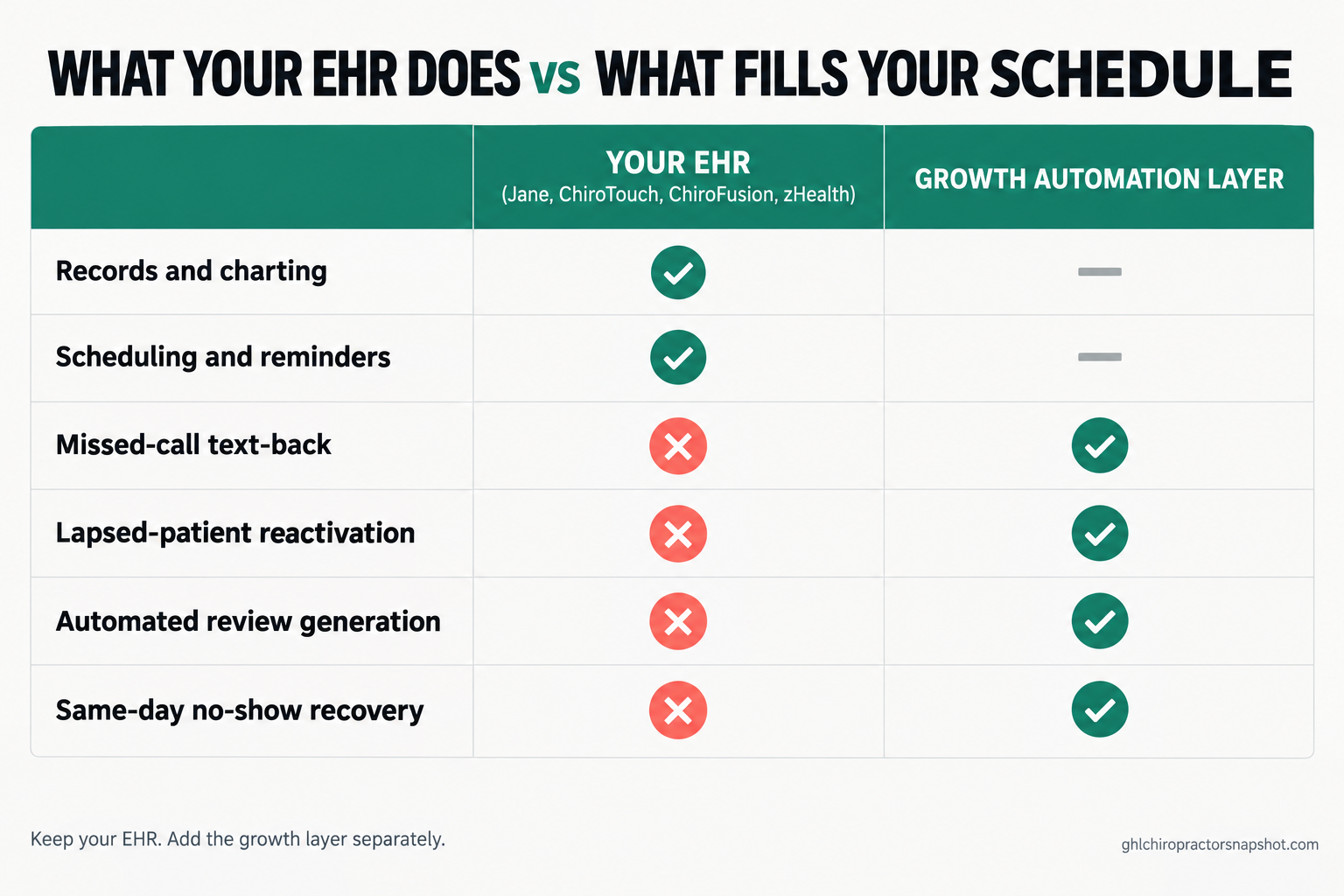
Here is the part the demos skip. Jane, ChiroTouch, ChiroFusion and zHealth all do a good job of recording the visit that already happened and reminding patients about the visit already booked. None of them is built to create the next visit from a patient who has drifted.
Think about where your money actually leaks. The phone rings while you are adjusting, no one picks up, and the lead books with the clinic down the road. A patient feels better at visit 6 and quietly stops, halfway through a plan they paid for. A happy patient would leave a five-star review if anyone asked. A lapsed patient from 14 months ago would come back for a tune-up if one well-timed text reached them. Your EHR watches all of this and does nothing, because recovering it is not its job.
That recovery is a different layer: marketing and growth automation. It is what turns a missed call into a booked exam with an automatic missed-call text-back, what runs a lapsed-patient reactivation campaign off your own list, and what nudges no-shows back onto the schedule the same day. For a deeper comparison of the communication tools that sit in this layer, see our patient communication software guide. The point for this post is simple: do not expect your records system to do it, and do not pay a premium for an EHR hoping it will. Keep the records tool that fits your billing, and add the growth layer separately.
Staying HIPAA-aware when your software texts patients
Whichever platform you pick, the moment it starts texting patients you inherit compliance duties. Automated SMS and email must not contain diagnosis, condition or treatment detail in the message body, and patients need written notice of the risk of unencrypted text and email before you start sending. Keep message copy generic: “a reminder about your appointment Thursday at 2pm,” never the reason for the visit. Reminders and recall must also stay TCPA-conscious, with clear consent and an easy opt-out.
This matters across all four tools because the built-in texting that makes zHealth or Jane attractive is exactly what can get a careless clinic in trouble. The software gives you the channel; the compliant copy and consent are on you. Our guide to HIPAA-compliant patient texting has the consent language and the safe message templates. None of this is legal advice, and rules vary by state, so confirm your approach with your own counsel.
Objections from the treatment room
“I already pay for ChiroTouch. Switching sounds like a nightmare.” Often it is not worth switching the EHR at all. If your records and billing work, the smarter move is usually to keep the platform and fix the actual leak, which is almost never the records system. Price your exit with the export email above, then decide. In most cases you keep the EHR and add the growth layer, and the “switch” you needed was never a software switch.
“Isn’t the cheap software just worse?” Not for a solo practice. ChiroFusion and Jane are cheaper because they are leaner and cloud-native, not because they are broken. The expensive platform is expensive partly because it is built for large insurance groups with needs you may not have. Pay for depth you will use, not depth that reassures you.
“Do I need separate marketing software on top of my EHR?” If you want to recover missed calls, reactivate lapsed patients and automate reviews and recall, yes, and that is normal. The EHR holds your records; the growth layer fills your schedule. Trying to force one tool to do both is how clinics end up overpaying for a platform that does neither job as well as two focused tools would.
“The demo made it look like the EHR does all of this already.” The demo turned every feature on and showed you the happy path. Real reminders are basic, real texting is often an add-on or a top tier, and reactivation of a patient who ghosted at visit 6 is simply not something a records system does. Ask question 1 from the list above and watch the all-in price appear.
Frequently asked questions
Which chiropractic software is cheapest for a solo practice in 2026?
By published entry price, Jane is cheapest at CA$54/mo for its limited Balance plan, though its real working tier is CA$79 to CA$99 (Pabau, 2026). zHealth Basic is $119/provider/mo and ChiroFusion is about $129/mo billed annually. ChiroTouch is the most expensive at $159/provider/mo for Core before add-ons. The cheapest tool for you depends on whether you bill insurance and how much patient texting you need built in.
How much does ChiroTouch really cost once you add everything?
ChiroTouch does not publish complete pricing. Third-party sources report Core at $159 and Advanced at $299 per provider per month, plus a one-time implementation fee of roughly $2,000 to $5,000 and $500 to $3,000 to migrate data in (PricingNow, 2026; SoftwareFinder, 2026). Payments, reminders and intake are reported as separate line items, and renewals rise around 5% a year, so your real cost is well above the sticker. Our ChiroTouch pricing teardown breaks it down.
Is Jane or ChiroFusion better for an insurance-heavy clinic?
ChiroFusion. It is an ONC-certified EHR with claims management built into a budget base price, and it keeps staff logins free while charging about $49/mo per additional provider (SoftwareAdvice, 2026; SaaSworthy, 2026). Jane handles insurance as a paid add-on and is better suited to cash and hybrid practices that value its clean scheduling and charting.
Which of these has the best built-in patient texting?
zHealth. Its top tier builds two-way texting, automated recall and no-show text reminders into the records system rather than relying on a separate tool (EMRFinder, 2026). Jane includes solid reminders and online booking. ChiroFusion and ChiroTouch handle reminders but lean on add-ons for richer messaging. All patient texting must stay HIPAA-aware and TCPA-conscious regardless of the platform.
What does it cost to switch chiropractic software or export my data?
It varies a lot. ChiroFusion lets you export at any time at no extra charge, and Jane offers self-serve CSV export plus fuller exports through support. ChiroTouch performs a full export only for a fee and otherwise exports charts one patient at a time, which is real lock-in. Across the industry, export and migration fees range from a few hundred to several thousand dollars (EHR Source, 2026), so ask about export before you join.
Do I still need separate software if my EHR sends reminders?
For reminders alone, no. But EHR reminders do not recover missed calls, reactivate lapsed patients, generate reviews, or run recall campaigns. Those jobs live in a growth-automation layer that sits alongside your records system. Most clinics keep the EHR that fits their billing and add a dedicated automation layer for the between-visit revenue, which is where the bigger leak is.
The software you pick for records is a cost to control, not the lever that grows your practice. Shortlist on your payer mix, your size and how much communication you want built in, price the real configuration with the seven demo questions, and get your export policy in writing. Then spend your attention on the leak that actually moves the number: the patients slipping away between visits, which no EHR on this list was ever built to catch.