

How do you let patients book online without overbooking your adjusting hours? You put rules on the calendar before you put the calendar on the internet. A booking link with no appointment types, no daily caps, and no protected adjusting blocks is not “going digital.” It is handing the public a lever that can drop a 45-minute new-patient exam into a 10-minute slot and back up your entire afternoon. The fix is not fewer bookings. It is a calendar that already knows your rules, so every self-booked slot lands where it should.
This is a build guide for that calendar: the seven scheduling rules that keep a chiropractic schedule full without wrecking the flow of your adjusting hours. Every number here is sourced and dated, and each rule comes with the way it breaks when you skip it.
Table of contents
- The 2:10pm problem, and why it is not the booking tool
- What an unruled calendar actually costs you
- The seven scheduling rules, in order
- Rule 1: Appointment types with real durations
- Rule 2: Protect the adjusting blocks
- Rule 3: Cap new-patient exams per day
- Rule 4: Buffers, lead time, and admin blocks
- Rule 5: Provider, room, and modality limits
- Rule 6: Route new and established patients differently
- Rule 7: Backfill and reminders
- Three clinics, three versions of the same rules
- Keeping it HIPAA-aware and TCPA-conscious
- Objections worth answering
- Frequently asked questions
The 2:10pm problem, and why it is not the booking tool
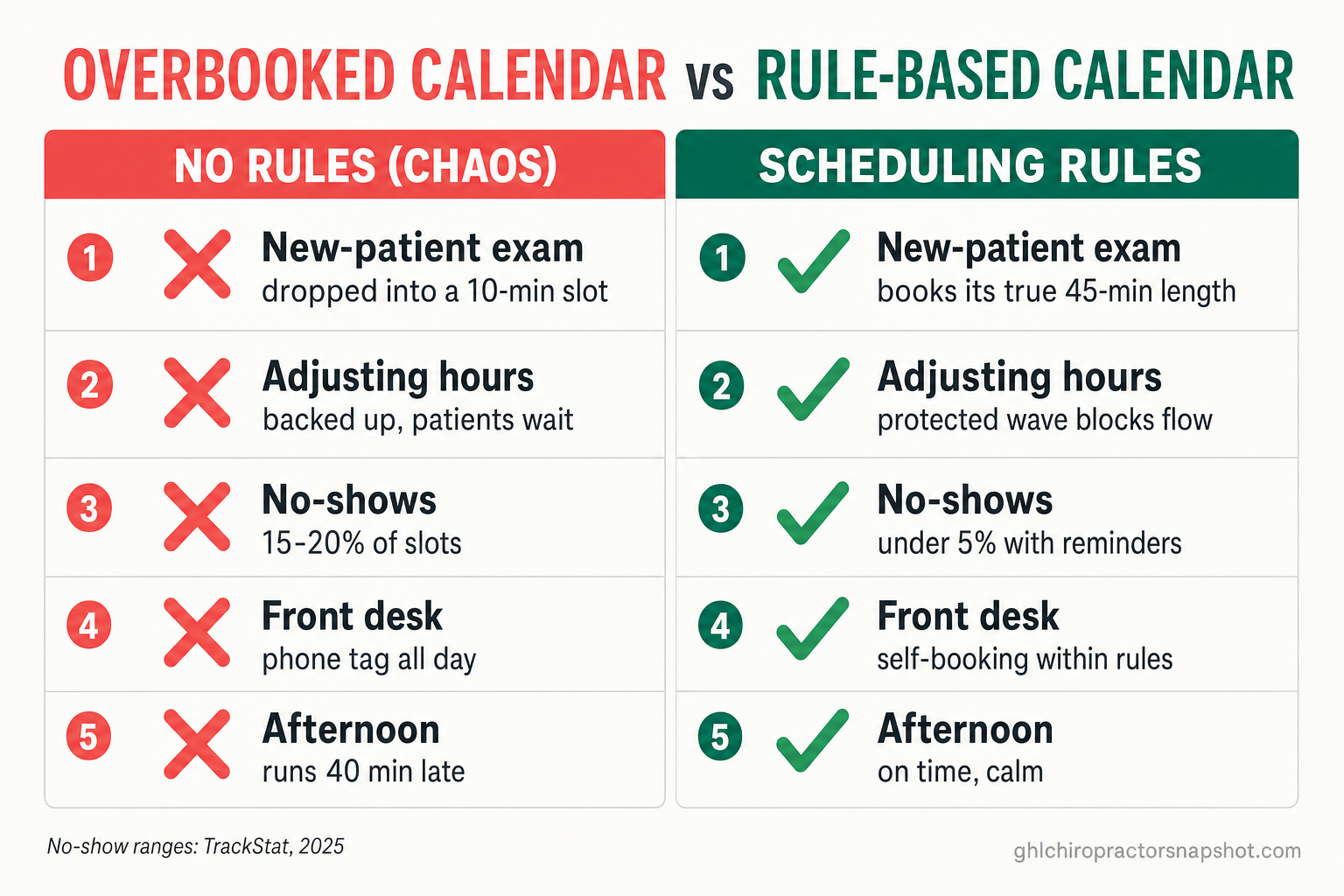
It is 2:10pm on a Tuesday. You have six patients stacked in the adjusting rooms, moving at roughly one every ten minutes, which is the rhythm your afternoon is built on. Then you glance at the schedule and see it: a brand-new patient, booked online last night, sitting in the 2:20 slot. New patients need a real exam. That is 45 minutes of history, orthopedic and neurological screening, and the report of findings, not a ten-minute pop-and-go.
Both options cost you. Give the new patient the full exam and the six established patients behind them wait, which turns a smooth afternoon into a 40-minute backup. Rush the exam instead and you start the relationship by teaching that person their time does not matter here. Neither is the schedule you wanted.
Here is the part that stings: this was not the booking tool’s fault. It offered an open slot with no idea that a new patient needs four times the length of an adjustment. The chaos people blame on “online scheduling” almost always traces back to a calendar with no rules on it. Put the rules in first and the same tool quietly protects your day instead of breaking it. That is the whole job of this guide.
What an unruled calendar actually costs you
Phone-only booking is not the safe default it feels like, and neither is an open online calendar. Both leak money at the edges of a busy day, where it is easy to miss.
Clinics without automated outreach commonly run 15 to 20% no-show rates, versus under 5% for those with consistent reminders (TrackStat, 2025). A single missed appointment costs a practice roughly $200 in lost revenue (Dialog Health, 2025), and across a year the no-show and cancellation drag lands between $15,000 and $40,000 for the average clinic (TrackStat, 2025). An unruled calendar makes this worse, because a schedule that runs late trains patients to arrive late or not at all.
The calendar is also where you win patients. About 67% of patients prefer to book appointments online, and roughly 8 in 10 would choose a provider specifically because online booking is available (Zippia, 2026). Meanwhile the average wait for an appointment has climbed to 31 days across healthcare (AMN Healthcare, 2025), so a clinic that lets a patient lock in a real slot tonight has a genuine edge. You want that demand. You just do not want it landing unfiltered. Rules are how you say yes to the booking and no to the chaos.
The seven scheduling rules, in order
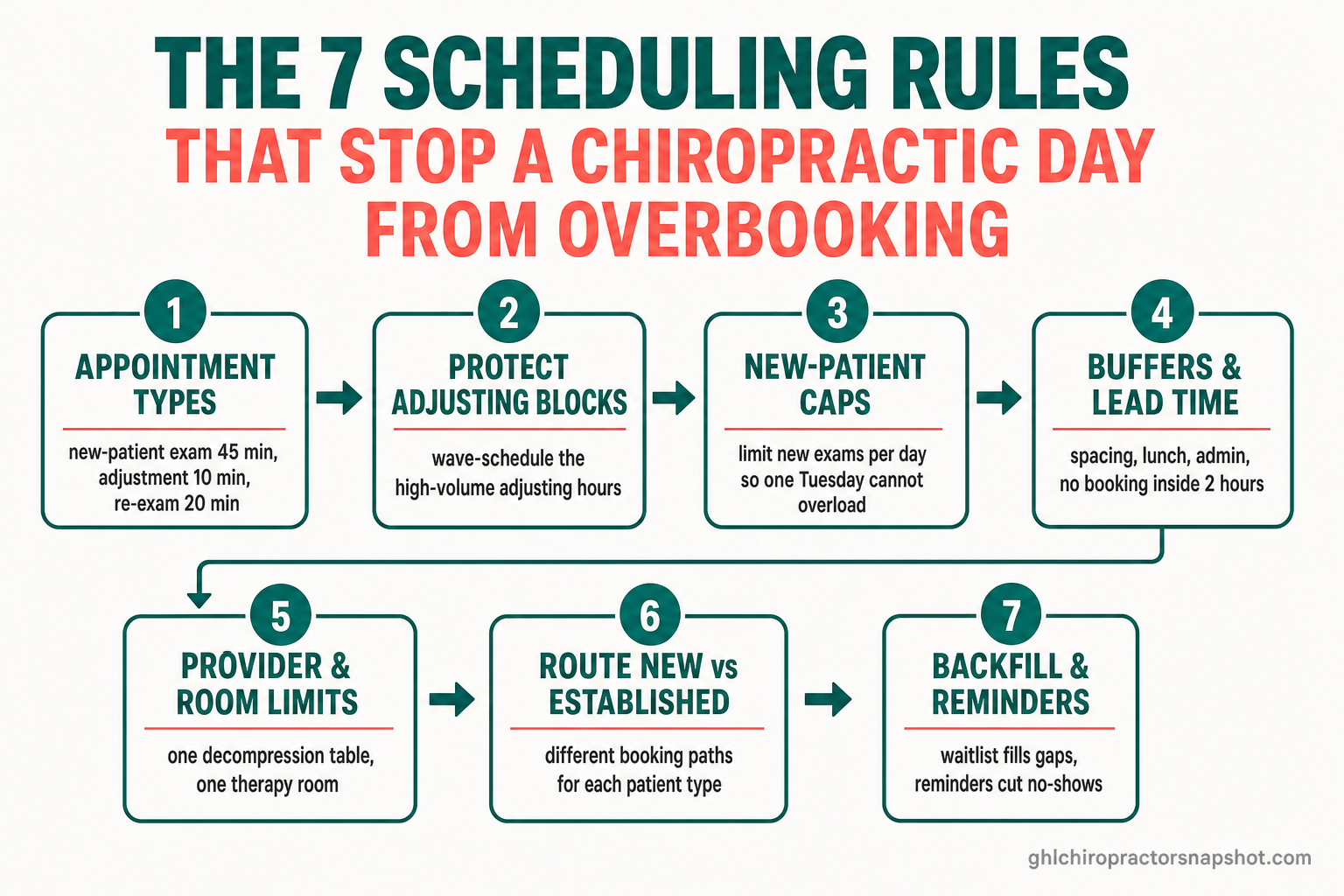
A calendar that fills itself without overbooking has seven rules on it. Skip any one and you feel it in a specific way: the wrong booking length, a backed-up adjusting block, an overloaded new-patient day, or an empty chair that a cancellation left behind. Here is the whole set, and the rest of this guide is one section per rule with the setup and the failure mode.
- Appointment types with real durations so the calendar books the right length.
- Protected adjusting blocks so quick visits flow and long visits never intrude.
- A daily cap on new-patient exams so a good day does not become an underwater one.
- Buffers, lead time, and admin blocks so the schedule breathes and stays yours.
- Provider, room, and modality limits so you never double-book the one decompression table.
- Routing that separates new and established patients so each gets the right path.
- Backfill and reminders so cancellations refill and no-shows shrink.
Rule 1: Appointment types with real durations
This is rule zero. Everything else depends on the calendar knowing that a new-patient exam and an adjustment are not the same thing. Write down every visit you offer and its true length: a new-patient exam at about 45 minutes, a re-exam or progress visit at about 20, a routine adjustment at about 10, a therapy or modality visit at about 15. Those are typical example durations, so use your own clinic’s real numbers. The point is that each type carries its length everywhere it is booked.
How it breaks: with one generic “appointment” type, the calendar offers the same slot to everyone. A new patient grabs a ten-minute opening and you are living the 2:10pm problem. Or the reverse: you block 45 minutes for a routine adjustment and waste 35 minutes of capacity you could have sold. Real appointment types prevent the most common self-scheduling disaster, and they are the foundation the 24/7 self-booking system sits on top of.
Rule 2: Protect the adjusting blocks
Your adjusting hours are the engine of the practice. They run on volume and rhythm, one patient every eight to twelve minutes, and they only work if nothing long drops into the middle of them. So protect them on purpose. Set aside named blocks in the day, say 8 to 11am and 3 to 6pm, where the calendar only offers short visit types: adjustments, quick therapy, progress checks. New-patient exams and long re-exams book into different windows, mid-morning or early afternoon, where a 45-minute visit does not stall a line of ten patients.
This is often called wave scheduling, and the idea is simple. Instead of one strict appointment per slot, you schedule the adjusting wave as a cluster the flow can absorb, then keep long visits in their own protected water. Volume is why this matters so much in chiropractic: it is a roughly $24 billion industry across about 66,061 businesses in the US (IBISWorld, 2026), and most are high-volume adjusting practices, not slow specialist offices.
How it breaks: let any visit type into the adjusting block and one 45-minute exam at 3:20 pushes every patient after it back by half an hour. By 5pm you are running 40 minutes late, the front desk is apologizing, and the last three patients are deciding whether next time they will bother.
Rule 3: Cap new-patient exams per day
New patients are the growth of the practice, and the most disruptive thing on the calendar, because each is a long visit plus a report of findings plus the load of a first impression. Left uncapped, a great marketing week drops five new-patient exams onto a single Wednesday and turns your best day into your worst. So cap it. Decide how many exams you can give full attention to in a day, maybe three or four for a solo doctor, and let the calendar stop offering that type once the cap is hit.
A cap is not a limit on growth. It protects the quality of the new-patient experience that drives your case acceptance and care-plan conversion. Overflow does not vanish; it rolls to the next open new-patient window, or to a short waitlist, so the person still gets in soon without capsizing today. And the demand is there to catch: about 71% of practices report fewer than a quarter of their patients self-schedule (MGMA, 2025), so the clinic that opens real online booking pulls more new patients than its competitors.
How it breaks: no cap means feast or famine. One Wednesday you run six exams and every adjusting patient waits; the next you have none and your long-visit windows sit empty. A cap smooths intake to a pace you can actually convert.
Rule 4: Buffers, lead time, and admin blocks
Three small rules, and together they keep the calendar yours instead of the public’s. First, buffers: a minute or two between visits so a patient who needs an extra moment does not push the next one late. Second, minimum lead time: no booking inside the next two hours, so nobody claims a slot while you are mid-adjustment with no chance to prepare. Third, admin and lunch blocks: protected time for notes, callbacks, and eating, marked unbookable so the calendar never sells it out from under you.
These feel minor, and they are the difference between a schedule that breathes and one that suffocates. A calendar with zero buffer and zero lead time has more open slots and no slack, so the first small delay cascades through the whole day. Clinics that run on time are not faster; they left room for reality.
How it breaks: with no lead-time rule, a patient books the 1:15 at 1:05 while you are with someone, and now there is a stranger in the waiting room and no chart prepared. With no admin block, your documentation slides to 7pm because the calendar sold your catch-up time.
Rule 5: Provider, room, and modality limits
If your clinic has more than a doctor and a table, the calendar has to respect your physical constraints. You have one decompression table, one therapy room, maybe an associate and a massage therapist. The booking system needs to know two patients cannot use the same table at once, and that an associate’s slots are separate from yours. This is resource-based scheduling, and without it the calendar will happily double-book the one machine you own.
Tie each appointment type to the resource it needs. A decompression visit consumes the table for its length, so the calendar should not offer that table to anyone else during it. An adjustment with the associate books the associate’s column, not yours. Model the resources once and the calendar can be as open as you like to the public without ever promising something you cannot deliver. Every self-booked patient also becomes a tagged contact in your patient CRM and workflows, so the front desk sees the whole picture, not just a name in a slot.
How it breaks: without resource limits, two patients get booked for the decompression table at 4pm, one waits or gets bumped, and you have created the exact bad experience online booking was supposed to prevent.
Rule 6: Route new and established patients differently
A brand-new patient and an established care-plan patient need different booking paths, and a good calendar routes them apart. The new-patient path is a conversion funnel: short and reassuring, offering only the exam type, landing inside a protected new-patient window within the daily cap. Speed matters, because if the calendar cannot take a patient who found you at 9pm, that lead is gone. When the front desk cannot answer, an AI receptionist and instant text-back catch the ones who call instead of clicking.
The established-patient path is frictionless rebooking. This person is on a plan and needs their next three visits, or a quick rebook, without re-entering everything they already told you. A returning-patient link, texted after a visit, lets them lock in the next appointment in seconds, and it can be allowed into the adjusting blocks new patients cannot touch, because their visit is short. This is where routing quietly protects retention: the easier the next visit is to book, the less a patient drifts off plan. Our guide to the chiropractic KPIs that predict growth covers which retention metrics to watch.
How it breaks: one path for everyone means either the new patient gets a confusing established-patient form, or the established patient gets forced through a full intake to book a ten-minute visit they have had fifty times. Both add friction exactly where you want none.
Rule 7: Backfill and reminders
Structure leaves gaps: a protected slot a cancellation empties, a capped day with a late opening. Rule seven fills those gaps automatically so your discipline does not cost you volume. A waitlist watches for cancellations and instantly texts standby patients to fill the opening, often within minutes, so an empty chair becomes a filled one instead of lost revenue. Our breakdown of automated waitlist backfill walks through the exact flow.
The second half is the reminder cadence, the highest-ROI thing on this list: a confirmation the moment a slot is booked, a reminder 48 hours out (early enough to reschedule a conflict), a 24-hour nudge, and an optional morning-of touch. Text is the workhorse. 98% of text messages are opened, and roughly 90% are read within three minutes (Notifyre, 2025), and text reminders alone reduce no-shows by as much as 38% (Klara, 2024). Pair reminders with one-tap rescheduling and a conflict becomes a moved visit instead of an empty chair. The full playbook lives in our guide to reducing no-shows at a chiropractic clinic.
Three clinics, three versions of the same rules
The seven rules are the same everywhere. How aggressively you set each one changes with the size of the practice.
The solo doctor (80 to 150 visits a week). Most of the market, and simplicity wins. One provider column, so resource limits are light. Set a low new-patient cap, three or four a day, and protect two adjusting blocks hard, because with one set of hands a backup has nowhere to go. Appointment types and protected blocks (rules 1 and 2) do most of the work here.
The two- to three-doctor clinic. Now routing (rule 6) and resource limits (rule 5) earn their keep. Each doctor needs their own bookable column, and the calendar has to keep an associate’s new patients off the owner’s protected blocks. You can raise the cap because you have more hands, but you need a rule for which doctor a new patient is routed to, so intake does not all pile onto one column. These practices are exactly where an unruled calendar creates the most cross-provider chaos.
The four- to five-doctor or multi-modality clinic. Here the resource model is the center of gravity. Decompression tables, therapy rooms, X-ray, and a massage therapist all become bookable resources with their own limits, and caps move from per-day to per-provider and per-room. The reminder and waitlist systems matter more, not less, because at this volume a 15% no-show rate is a five-figure monthly leak. The rules do not change; the number of resources they govern does.
An unruled calendar vs. a rule-based one
| Plan | Unruled calendar | Rule-based calendar recommended |
|---|---|---|
| Price | Chaos | Control |
| Feature 1 | One generic slot type for every visit | Appointment types carry real durations |
| Feature 2 | New-patient exams land in adjusting blocks | Protected wave blocks keep adjusting flowing |
| Feature 3 | No cap, so a good week overloads one day | Daily new-patient cap smooths intake |
| Feature 4 | Double-booked table and provider conflicts | Resource limits prevent double-booking |
| Feature 5 | Same path for new and established patients | New and established patients routed apart |
| Feature 6 | Empty slots from cancellations stay empty | Waitlist backfills and reminders cut no-shows |
| See appointment automation |
Keeping it HIPAA-aware and TCPA-conscious
Scheduling touches patient data and messaging, so two guardrails are non-negotiable, and both are easy to build into the templates once.
- HIPAA-aware: keep protected health information out of plain SMS and out of booking confirmations. A confirmation says “You are booked for Thursday at 2:15 at [Clinic],” never a diagnosis, a condition, or a treatment reason. Any health-related intake belongs in a secure form and your records system, not in a plain-text reminder. Patients should also get written notice that plain text and email are not encrypted before you message them there.
- TCPA-conscious: capture explicit consent to text and email as part of the booking flow, a checkbox the patient actively agrees to, and include a clear opt-out (“Reply STOP to unsubscribe”) on automated messages. Honor opt-outs instantly and respect quiet hours.
These are constraints you set once and then stop thinking about. We are an automation system for chiropractic clinics, not a healthcare provider, and nothing here is legal advice. Confirm your specific obligations with your own counsel and your state board.
Objections worth answering
“Won’t all these rules make me lose bookings?” The opposite. Rules do not close slots; they route bookings to the right ones. A patient still books at 9pm, they just book the correct visit type into a window that can hold it. What you lose is the bad booking, the new patient in a ten-minute slot, that was going to cost you an hour and an apology. Fewer bad bookings, not fewer bookings.
“I already run scheduling in ChiroTouch or Jane. Why change anything?” You may not need to change tools. These rules are settings, not software. If your current system supports real appointment types, resource limits, caps, and a public booking link with lead time, configure them there. The gap is often not the calendar but the layer around it: the automated waitlist, the cross-channel reminder cadence, and the routing, which is where a system like the Chiropractor Snapshot’s appointment automation adds the parts an EHR calendar usually lacks.
“Isn’t wave scheduling just double-booking with a nicer name?” No. Double-booking puts two full appointments in one slot and hopes. Wave scheduling clusters short, predictable visits into a block whose rhythm you already run, and keeps long visits out of it entirely. One is a gamble on your day; the other is a plan for it.
“Do I need to be technical to set this up?” No. The hard part is the thinking: writing down your appointment types, durations, blocks, and caps. That is a whiteboard exercise you can do in an afternoon. The building is either an afternoon of settings in your current tool, or a done-for-you install. Book a quick walkthrough and we will show you the whole rule set running on a live calendar.
Frequently asked questions
Chiropractic scheduling rules FAQ
What is the most important chiropractic scheduling rule?
Appointment types with real durations. If the calendar cannot tell a 45-minute new-patient exam from a 10-minute adjustment, it will book the wrong length and back up your day. Every other rule (protected blocks, caps, routing) depends on the calendar first knowing what kind of visit it is booking.
How do I stop online booking from overbooking my adjusting hours?
Protect the adjusting blocks. Set named windows in the day where the calendar only offers short visit types (adjustments, quick therapy, progress checks) and route new-patient exams and long re-exams into separate windows. This is wave scheduling: cluster the short, predictable visits your adjusting flow already runs, and keep long visits out of that block entirely.
What is wave scheduling in a chiropractic clinic?
Wave scheduling clusters several short, predictable visits into a block whose rhythm you already run (one patient every eight to twelve minutes), instead of forcing one rigid appointment per slot. It is not double-booking, which puts two full appointments in one slot and hopes; wave scheduling plans the flow of your busiest adjusting hours and keeps long visits out of them.
How many new patients should I let book per day?
Set a cap you can actually convert with full attention, often three or four new-patient exams a day for a solo doctor, higher for a multi-doctor clinic with more hands. A cap is not a limit on growth; it protects the quality of the new-patient experience that drives case acceptance, and overflow rolls to the next open window or a short waitlist so nobody is turned away.
Is online appointment booking HIPAA compliant for a chiropractor?
It can be, when built correctly. Keep protected health information out of plain SMS and booking confirmations (send only identity and time, never a diagnosis or treatment reason), collect health-related intake in a secure form, give patients written notice that plain text and email are unencrypted, capture TCPA consent at booking, and include a one-tap opt-out. This is operations guidance, not legal advice; confirm your obligations with your own counsel.
About the author
Rey Alcantara is a GHL Automation Strategist on the GHL Chiropractor Snapshot team, based in Austin, TX. He builds the booking, intake, and speed-to-lead systems that ship inside the snapshot, after a decade running marketing-ops for multi-location wellness brands. He writes about the unglamorous plumbing (appointment types, calendar rules, waitlist backfill, and reminder cadences) that keeps a chiropractic schedule full. Rey is an automation and marketing specialist, not a licensed chiropractor, and nothing here is medical or legal advice.
Sources
- TrackStat: Reducing No-Show Rates in Chiropractic Clinics (2025) and The Cost of Missed Appointments for Busy Chiropractic Clinics
- Dialog Health: Patient No-Show Statistics (2025)
- Zippia: Appointment Scheduling Statistics 2026: Online Booking Trends
- AMN Healthcare: 2025 Survey of Physician Appointment Wait Times
- MGMA: Meeting the Competitive Pressure on Patient Digital Self-Scheduling (July 2025 MGMA Stat poll)
- Notifyre: SMS Marketing Statistics (2025)
- Klara: Text Reminders Reduce No-Shows by 38% (2024)
- IBISWorld: Chiropractors in the US Market Size (2026)
Figures are attributed to the sources and years shown. No-show rates, costs, and durations vary by clinic, region, and patient mix; the durations shown are illustrative examples and the no-show and cost figures are representative ranges, not guarantees. This article is operations guidance for chiropractic clinics and the agencies that serve them, not medical, legal, or financial advice. Keep all patient messaging HIPAA-aware (no PHI in plain SMS) and TCPA-conscious (consent and opt-out).