

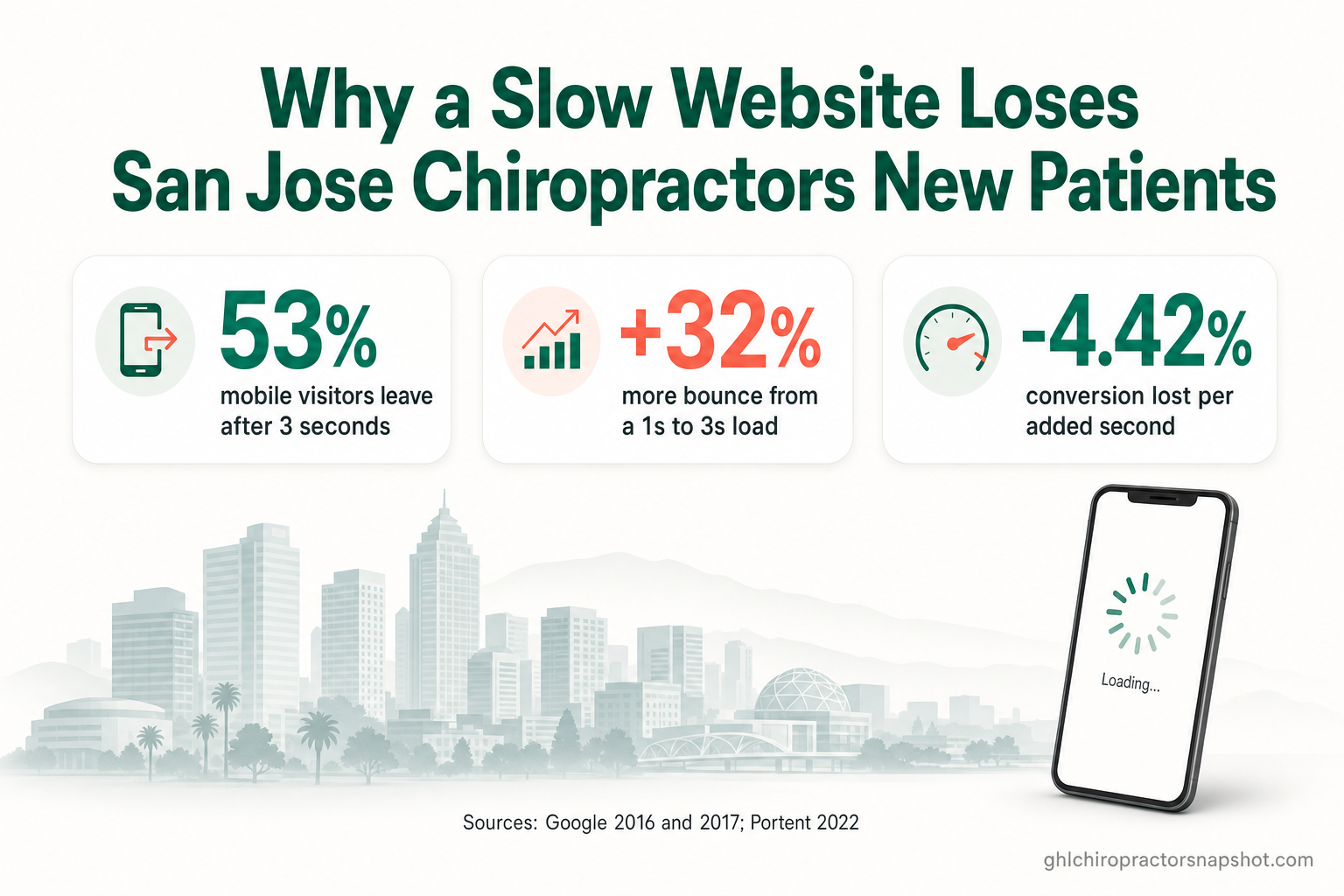
Does website speed actually lose a chiropractor new patients? Yes — measurably. When a page takes longer than three seconds to load, 53% of mobile visitors abandon it (Google/DoubleClick, 2016), and the probability that a visitor bounces climbs 32% as load time goes from one second to three (Google/SOASTA, 2017). In San Jose — where more than a million people research everything on a phone before they call — a slow chiropractic website isn’t a cosmetic problem. It’s a leak in your new-patient pipeline that never shows up on a report, because the patient you lost never became a lead. This playbook shows exactly what “slow” costs, how Google now grades your site, and how to fix it.
San Jose is the third-largest city in California, with a population of 1,013,240 recorded in the 2020 Census (U.S. Census Bureau) — the beating heart of Silicon Valley, and one of the most phone-first, expectation-heavy markets in the country. Your prospective patients here compare websites the way they compare apps: if yours stalls, they hit back and open the next clinic in the list. This guide is for clinic owners and the GoHighLevel agencies that serve them. Every statistic below is dated and linked to its source.
Table of contents
- The short answer for a San Jose clinic
- What a slow website actually costs you
- Core Web Vitals: the three numbers Google grades
- Why this hits San Jose clinics harder
- The 5 things making your chiropractic website slow
- How to fix it: patch vs. rebuild
- Frequently asked questions
The short answer for a San Jose clinic
If your website takes more than about three seconds to become usable on a phone, you are losing new patients you will never see in your data — because they leave before they fill anything in. The fix is not another speed plugin or a bigger hosting plan. It’s a site built to be fast from the ground up: lightweight, mobile-first, and served close to the visitor, so the page paints in well under Google’s “good” thresholds.
That matters for two reasons at once. First, patients decide in the first few seconds whether your clinic feels current and trustworthy; a slow, janky page reads as “this place is behind.” Second, Google uses page experience — including Core Web Vitals — as one of the signals that decides who ranks for “chiropractor near me” (Google Search Central). A slow site loses on both fronts: fewer people find you, and more of the ones who do bounce before booking.
The rest of this playbook quantifies the cost, explains the three numbers Google actually measures, and lays out how to fix them without duct tape.
What a slow website actually costs you
Speed doesn’t feel like a revenue problem, which is exactly why it’s dangerous. There’s no error message when a patient gives up on a slow page — they simply never arrive. The research on this is unusually clear and comes straight from the companies that measure billions of page loads.
Start with the abandonment cliff. Google’s own research found that 53% of mobile site visits are abandoned if a page takes longer than three seconds to load (Google/DoubleClick, 2016). Half your phone traffic — and for a local clinic, phone traffic is most of it — can walk out the door before your homepage finishes drawing.
It gets worse the slower you go. Analyzing real mobile loads with a neural model, Google and SOASTA found bounce probability doesn’t rise in a straight line; it accelerates:
And the visitors who don’t bounce still convert less. Portent’s analysis of 94 million-plus page views found that the first five seconds of load time have the highest impact on conversion, with conversion rates dropping an average of 4.42% for every additional second between 0 and 5 seconds (Portent, 2022). For a chiropractic site, “conversion” is a booked new-patient exam or a call — the exact thing your marketing budget is paying to produce.
The flip side is the encouraging part: speed gains pay back fast. In a Deloitte and Google study of 37 brands across roughly 30 million sessions, a mere 0.1-second improvement in mobile load time lifted results across the funnel (web.dev, 2020):
Core Web Vitals: the three numbers Google grades
You don’t have to guess whether your site is fast enough — Google publishes the thresholds. They’re called Core Web Vitals, and they measure three specific things about the real-world experience of loading your page. As of March 2024, Interaction to Next Paint (INP) replaced First Input Delay as the responsiveness metric (web.dev, 2024).
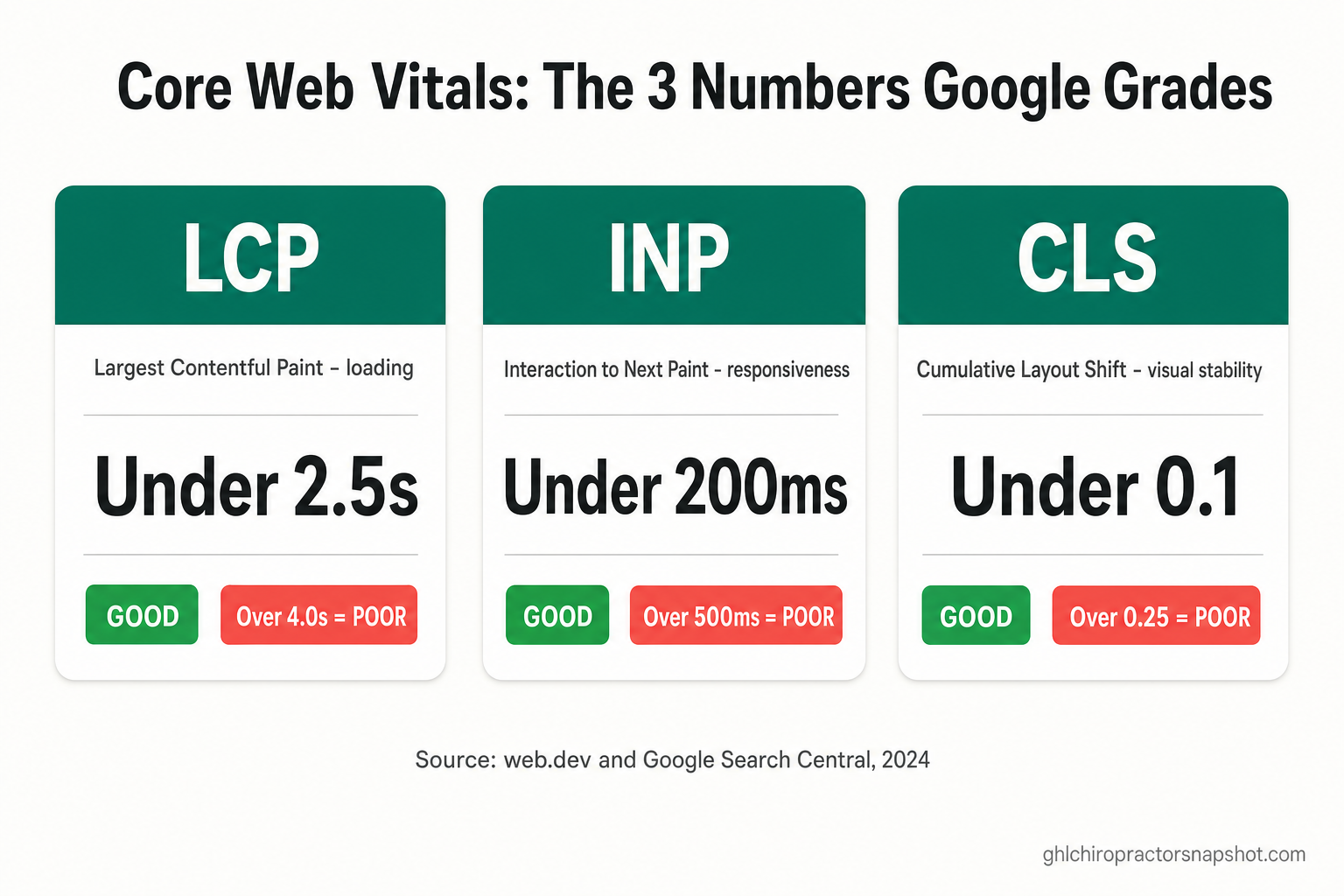
Here’s what each one means for a chiropractic website, and where the line between “good” and “poor” falls:
| Metric | What it measures | “Good” | “Poor” |
|---|---|---|---|
| LCP — Largest Contentful Paint | How fast the main content (your hero image or headline) appears | ≤ 2.5s | > 4.0s |
| INP — Interaction to Next Paint | How quickly the page responds when a patient taps “Book” or a menu | ≤ 200ms | > 500ms |
| CLS — Cumulative Layout Shift | How much the layout jumps around while loading | ≤ 0.1 | > 0.25 |
Source: web.dev — Core Web Vitals and Google Search Central, 2024. Google measures these at the 75th percentile of real visits, so it’s not your fast test on office wifi that counts — it’s the patient loading your site on cellular in a parking lot off Story Road.
Why this hits San Jose clinics harder
Three forces stack up in a market like San Jose to make website speed matter more here than almost anywhere.
It’s a phone-first patient base. Mobile now accounts for more than 60% of all web traffic worldwide (StatCounter, 2025), and for a local health search — “chiropractor near me,” tapped one-handed between meetings — that share runs even higher. Mobile is exactly where slow sites fail hardest, because phones have less processing power and flakier connections than the desktop you probably built the site on.
Patients vet you online before they ever call. In healthcare, the website is the first appointment. 84% of patients check online reviews before booking a provider (rater8 Patient Choice Report, 2025), and a strong, professional online presence is now table stakes for getting chosen (Healthgrades, 2025). If your reviews are great but your site won’t load, they never get to the reviews.
The competition here is fierce and the expectations are high. This is Silicon Valley — your patients build and use fast software all day, and a sluggish site reads as a red flag about the whole practice. With over a million residents (U.S. Census Bureau) and a dense field of clinics from Willow Glen to North San Jose competing for the same searches, the difference between page one and page two — and between a fast page and a slow one — is the difference between a full new-patient calendar and a quiet one. (For the ranking side of that equation, see our guide to local SEO for chiropractors.)
The 5 things making your chiropractic website slow
Most slow clinic sites are slow for the same handful of reasons. In rough order of how often they’re the culprit:
- A heavy page builder or theme. WordPress with a bloated theme and a stack of plugins, a Wix template, or a drag-and-drop GHL page can ship hundreds of kilobytes of JavaScript and CSS the visitor’s phone has to download and run before anything is usable. This is the single biggest driver of poor LCP and INP.
- Giant, unoptimized images. A 4 MB hero photo straight off a camera, served full-size to a phone, is the classic LCP killer. Modern formats (WebP/AVIF), correct sizing, and lazy-loading fix it — but most builders don’t do this automatically.
- Third-party scripts. Chat widgets, booking embeds, tracking pixels, review carousels, and font loaders each add round-trips and main-thread work. Individually small; together, they’re often half your load time.
- Layout shift from late-loading elements. Ads, embeds, and web fonts that pop in after the fact shove your content around — that’s CLS, and it makes a patient mis-tap the wrong button.
- Slow or distant hosting. Shared hosting that renders every page on request, far from the visitor, adds latency before the first byte even arrives. Static, edge-served pages remove that wait entirely.
How to fix it: patch vs. rebuild
There are two roads. You can keep patching the site you have, or you can move to a foundation that’s fast by design. Patching helps at the margins; it rarely gets a heavy builder site into consistent “good” territory on mobile, because the weight is baked into the platform.
| Patch the existing site | Rebuild on a fast foundation | |
|---|---|---|
| What you do | Compress images, add a caching plugin, trim a few scripts | Move to a static, mobile-first build served from the edge |
| Typical mobile result | Often still 40–70; gains erode as plugins are added back | 90+ PageSpeed, frequently 100, and it stays there |
| Core Web Vitals | Improves LCP a little; INP/CLS usually unchanged | LCP, INP, and CLS all built to pass “good” |
| Ongoing effort | Recurring — every new plugin re-bloats it | Handled for you; nothing to babysit |
| Best for | A short-term stopgap | A clinic that wants speed to stop being a problem |
The reason a rebuild wins isn’t magic — it’s architecture. A site built on a modern static framework ships almost no JavaScript by default, optimizes images automatically, and serves pre-built pages from servers close to the visitor. That’s the whole game for Core Web Vitals. It’s also why our done-for-you clinic sites are built on Astro with a guaranteed 90+ Google PageSpeed score on both mobile and desktop, with hosting, SSL, online booking, and schema markup wired in rather than bolted on. (We break the platform trade-offs down in detail in Astro vs. WordPress for a chiropractor website and GoHighLevel websites vs. Astro.)
Speed also isn’t the only thing a rebuild fixes. A page that loads instantly and then lets a patient book online in a few taps is what actually turns a fast load into a booked exam — the two have to work together.
If you’d rather see exactly what’s inside a build first, the prebuilt chiropractic website feature page walks through it component by component, and pricing is a single, one-time number with no surprises.
Frequently asked questions
How fast should a chiropractic website load?
Aim for your main content to appear in under 2.5 seconds on mobile — that's Google's 'good' threshold for Largest Contentful Paint. Beyond about 3 seconds you start losing visitors fast: 53% of mobile users abandon a page that takes longer than 3 seconds to load (Google, 2016). Faster is always better; a site that paints in around 1 second converts meaningfully higher than one at 5 seconds.
What are Core Web Vitals and why do they matter for my clinic?
Core Web Vitals are three metrics Google uses to score real-world page experience: LCP (loading, good under 2.5s), INP (responsiveness, good under 200ms), and CLS (visual stability, good under 0.1). They matter because Google folds page experience into rankings, and because they directly reflect whether a patient on a phone has a smooth, trustworthy experience or a frustrating one.
Will just installing a speed or caching plugin fix my slow site?
Usually only partially. Caching and image plugins help at the margins, but if the site runs on a heavy page builder or theme, the JavaScript and layout weight that hurt INP and CLS are baked into the platform. Plugins also tend to re-bloat a site over time. A structural fix — a lightweight, static, mobile-first build — is what reliably reaches a 90+ mobile score and stays there.
Does website speed really affect my Google ranking in San Jose?
It's one signal among many. Google uses page experience, including Core Web Vitals, as a ranking consideration — it won't outrank great, relevant content on its own, but between two comparable clinics, the faster, smoother, mobile-friendly site has the edge. Just as important, speed decides how many searchers who land on your page actually stay long enough to book.
How do I check my own website's speed for free?
Use Google's PageSpeed Insights at pagespeed.web.dev. Enter your homepage and your new-patient page, and read the mobile score plus the field data for LCP, INP, and CLS. If mobile is stuck in the 40–70 range, you have a speed problem worth fixing — and it's likely costing you new patients you never see.
About the author
Derek Osei is a Local Marketing & Reviews Specialist who helps chiropractic clinics get found and chosen in local search. He builds the Google Business Profile, review-generation, and website-conversion systems that move a clinic into the local 3-pack and turn search intent into booked exams. He writes practical, no-fluff playbooks on local SEO, site performance, and new-patient acquisition for the GHL Chiropractor Snapshot. He is a marketing specialist, not a licensed chiropractor, and nothing here is medical advice.